General Knowledge
- Compass Parent Guides
- IT Incident Priorities
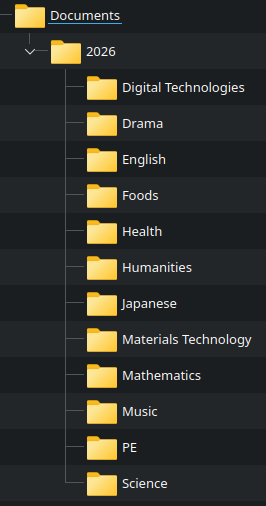
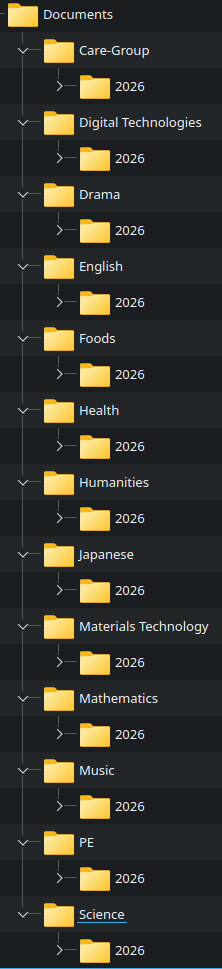
- Recommend Folder Structure
- Resetting Your @education Password (for staff)
- School Bell Times
- School Map
- 📧 Outlook Mailbox Auto Archive (In-Place Archive)
Compass Parent Guides
Please follow the below link
A guide for parents & families | Compass Education AU
IT Incident Priorities
| Priority |
Incident Type / Examples |
IT Action |
| Immediate / Critical |
Classroom or office disruptions: - TV/Projector failure - CRT laptop failure - Network outage (Internet) - College service disruption |
IT will respond immediately to the incident. Action may include troubleshooting, equipment replacement (where feasible), or providing an estimated resolution time. |
| High / Urgent |
Essential services impacting workflow: - Email not working - Printing failure - Key devices malfunctioning |
IT will respond within 2 hours, with a fix, equipment replacement (if possible), or estimated turnaround time. |
| Medium / Standard |
Standard Non-critical student or staff IT issues: - Software problems - Account access / password resets - Minor hardware issues - Classroom scheduling or booking issues |
IT will respond within 24 hours, providing a fix, equipment replacement (if possible), or an estimated resolution time. |
| Low / Advisory |
General IT inquiries or requests: - Guidance or training requests - Suggestions for improvements - Non-urgent information requests |
IT will respond within 48 hours, providing assistance or guidance as needed. |
Recommend Folder Structure
|
Option 1
all Downloads are saved in your Downloads folder For Windows C:\users\username\Downloads
For MACOS
/Users/username/Downloads/ |
Option 2
|
Resetting Your @education Password (for staff)
Option 1: Self-Service (Recommended)
If you have a mobile number linked to your account:
- Click "Forgot Password" on the login page.
- A verification code will be sent to your registered phone number.
- Enter the code to reset your password.
This is the fastest and most convenient way to regain access.
If your mobile number is not yet registered, the I.T. department can assist you, or you can follow the official setup guide.
Option 2: I.T. Department Reset
If no mobile number is associated with your account:
- The I.T. department can issue you a temporary password.
- You must update this password within 7 days.
Important: Wait at least 24 hours after receiving your temporary password before attempting to update it.
Self-Service Password Reset (SSPR) Registration
Staff can also register for self-service password resets by setting up three security questions in advance.
Register here: edupassmyaccount.education.vic.gov.au
⚠️ This must be set up before you need it. Please contact the I.T. department if you require assistance.
School Bell Times
| Monday - Friday | ||
| Locker Bell | 08:55 | |
| Period 1 | 09:00 | 10:00 |
| Period 2 | 10:03 | 11:03 |
| Recess | 11:03 | |
| Locker Bell | 11:28 | |
| Period 3 | 11:32 | 12:32 |
| Period 4 | 12:35 | 13:35 |
| Lunch | 13:35 | |
| Locker Bell | 14:13 | |
| Period 5 | 14:18 | 15:18 |
| First Bus | 15:25 | |
School Map

📧 Outlook Mailbox Auto Archive (In-Place Archive)
Overview
When your Outlook mailbox reaches 96% of its storage capacity, the system will automatically move older emails to your Online Archive (also known as In-Place Archive). This helps prevent mailbox overflow and reduces the need for manual cleanup.
How It Works
- Once your mailbox hits 96% capacity, Outlook triggers an automatic archiving process.
- Older emails are moved from your primary mailbox to your Online Archive.
- This process runs in the background and requires no user action.
Where Do Archived Emails Go?
- Emails are moved to your Online Archive mailbox, which appears in Outlook as a separate folder tree.
- You can access it in:
- Outlook Desktop App (left-hand folder pane under “Online Archive”)
- Outlook Web (OWA)
Important Notes
- ✅ The Online Archive is still part of your overall storage allocation (not external storage).
- ✅ Archived emails are fully searchable and accessible anytime.
- ✅ This process helps keep your primary mailbox performant and under quota.
- ❗ Moving emails to the archive does not free unlimited space—it simply redistributes usage within your account.
Benefits
- Reduces risk of mailbox full errors
- Improves Outlook performance
- Minimises need for manual cleanup or PST files
- Keeps older emails accessible without cluttering your inbox
What You Should Do
- No immediate action is required when this happens.
- However, you may want to:
- Regularly review and delete unnecessary emails
- Empty Deleted Items and Junk folders
- Be mindful of large attachments