Compass Resolving Attendance Write-Back Failures from Compass to CASES21
When a user exits, their attendance records must be reconciled, or it will cause errors (Attendance records after exit date) when Compass attempts to write the school attendance data back to CASES21.
If attendance write-backrecords fromexist Compassfor toa CASES21student fails,after their exit date you maycan needremove tothem delete the affected student enrollments. Followfollowing these steps carefully:to delete them:
Steps to Delete Student Enrollments
- Navigate to the student's profile page in
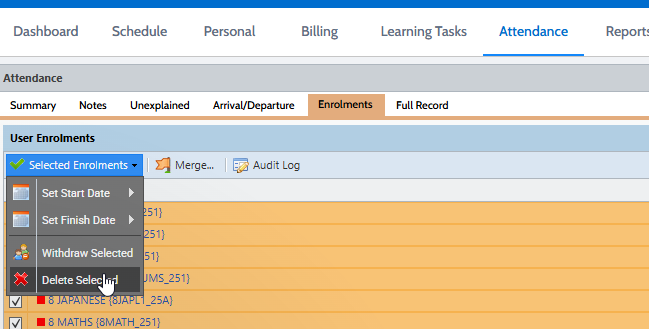
CASES21.Compass. - Go to the Attendance tab, then click on the Enrollments sub-tab.
- Check the boxes next to the relevant enrollments that need to be removed.
- Click Selected Enrollments.
- From the drop-down menu, select Delete Enrollments.
In the warning box, type: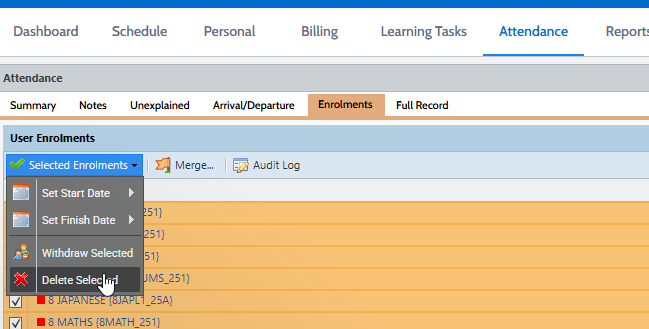
You will also need to delete any attendance notes.
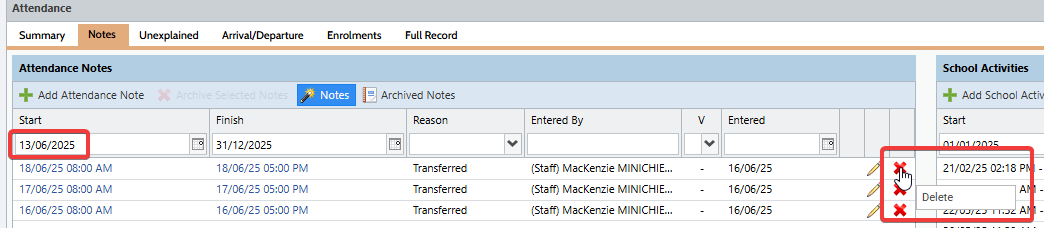
- Move to the Notes tab, then set the start date filter to the day the student exited.
- Delete any filtered notes.